Git & GitHub Basic Tutorial
Git is a distributed version control system that is used to track changes in source code during software development. It is designed for coordinating work among programmers, but it can be used to track changes in any set of files. Its goals include speed, data integrity, and support for distributed, non-linear workflows.
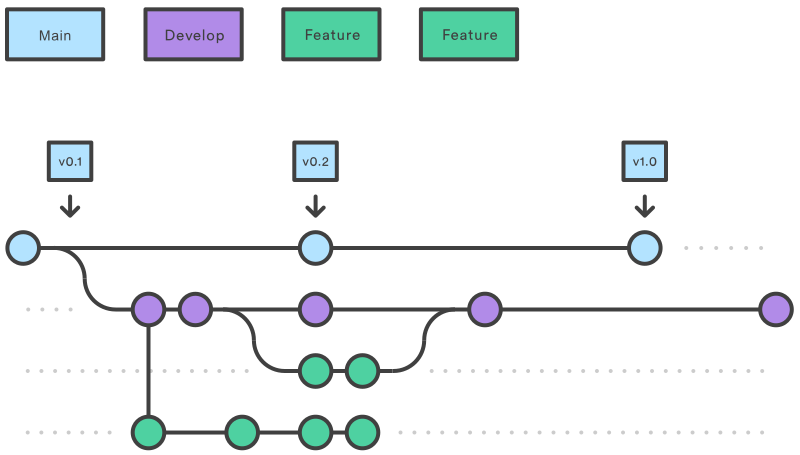
The motivation of this class
In this lesson, the goal is to introduce Git and GitHub in the simplest way possible. The focus isn't on mastering Git but rather on understanding enough to make basic contributions. By the end of this lesson, you'll know how to:
Use Git for basic version control.
Interact with GitHub to collaborate on projects.
Make simple contributions to this blog, such as fixing typos, improving explanations, or adding small insights.
Let's get started!
First of all, Let's check if git is installed on your device.
$ git --version > git version 2.37.1
But!.. if you don't have it
You can download it with these several ways:
Linux (All Distros)
Debian/Ubuntu-based
$ sudo apt update && sudo apt install git -y
Arch
$ sudo pacman -S git
Gentoo
$ sudo emerge --ask dev-vcs/git
Void Linux
$ sudo xbps-install -S git
Alpine Linux
$ sudo apk add git
Windows (Using Terminal)
If you have Winget (Windows 10/11), install Git with:
$ winget install --id Git.Git -e --source winget
If you have Chocolatey installed:
$ choco install git -y
If you have Scoop installed:
$ scoop install git
macOS (Using Terminal)
If you have Homebrew installed:
$ brew install git
After that you can now use git..
Core Concepts
- Repository: Project folder tracked by Git
- Commit: Snapshot of your changes
- Branch: Parallel version of code
- Remote: Cloud-hosted repository (GitHub)
Git Workflow
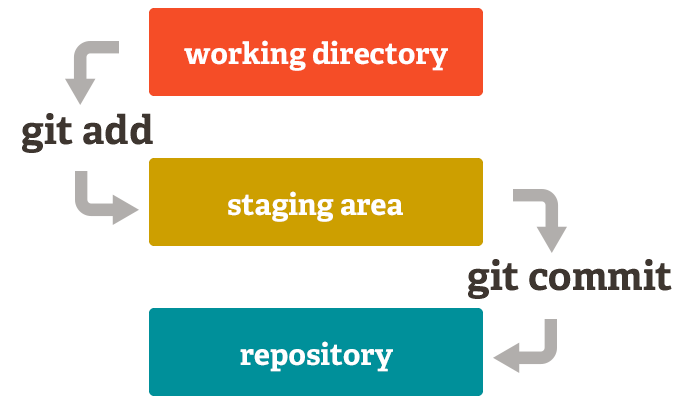
Workflow Command
$ git init # Initialize new repository
$ git add [file]# Stage changes
$ git commit -m "message"# Save changes
Branch Management
$ git branch [name]# Create new branch
$ git checkout [branch]# Switch branches
$ git merge [branch]# Combine branches
Warning: Always pull before pushing!
git pull origin main
GitHub Integration
$ git remote add origin [url]# Connect to GitHub
$ git push -u origin main# First push
$ git clone [url]# Download repository
Conflect Resulotion
- Edit conflicted files
- git add [file]
- git commit -m "resolve conflict"
$ git status
> On branch main
> Your branch is up to date with 'origin/main'.